You are in the process of creating a new customer number. We require the following personal information about any new user before concluding this task. Please notice, this webform should only be used for new users without a CPR-number. If your purpose is to create an additional user for the same person, please contact your advisor and request the additional user.View this form in Danish
What you as an administrator need to do:
Please send the below information to the user you would like to add to the agreement:
The Danish CVR-number (8 digits) or District agreement ID (6 digits).
Name of the primary contact person(s) (the administrator who will create the user), including District user ID(s).
You will receive the customer number in an email when the user has provided the required information. You can then proceed with creating the new user.
What you as a new user need to do:
Please fill in the form with the information provided by your administrator (see above), and your personal information and securely upload the required documentation. We need two different ID-documents, one dated document for address-confirmation which can’t be older than 6 months. In addition, you need to fill out below PEP-document.
If you require assistance or have any other related questions, please contact us here (+47) 98706030 (English speaking support). Support opening hours Monday - Friday 8am-4pm (CET).
Please be aware of a processing time of up to 48 hours before the update is registered in our systems.
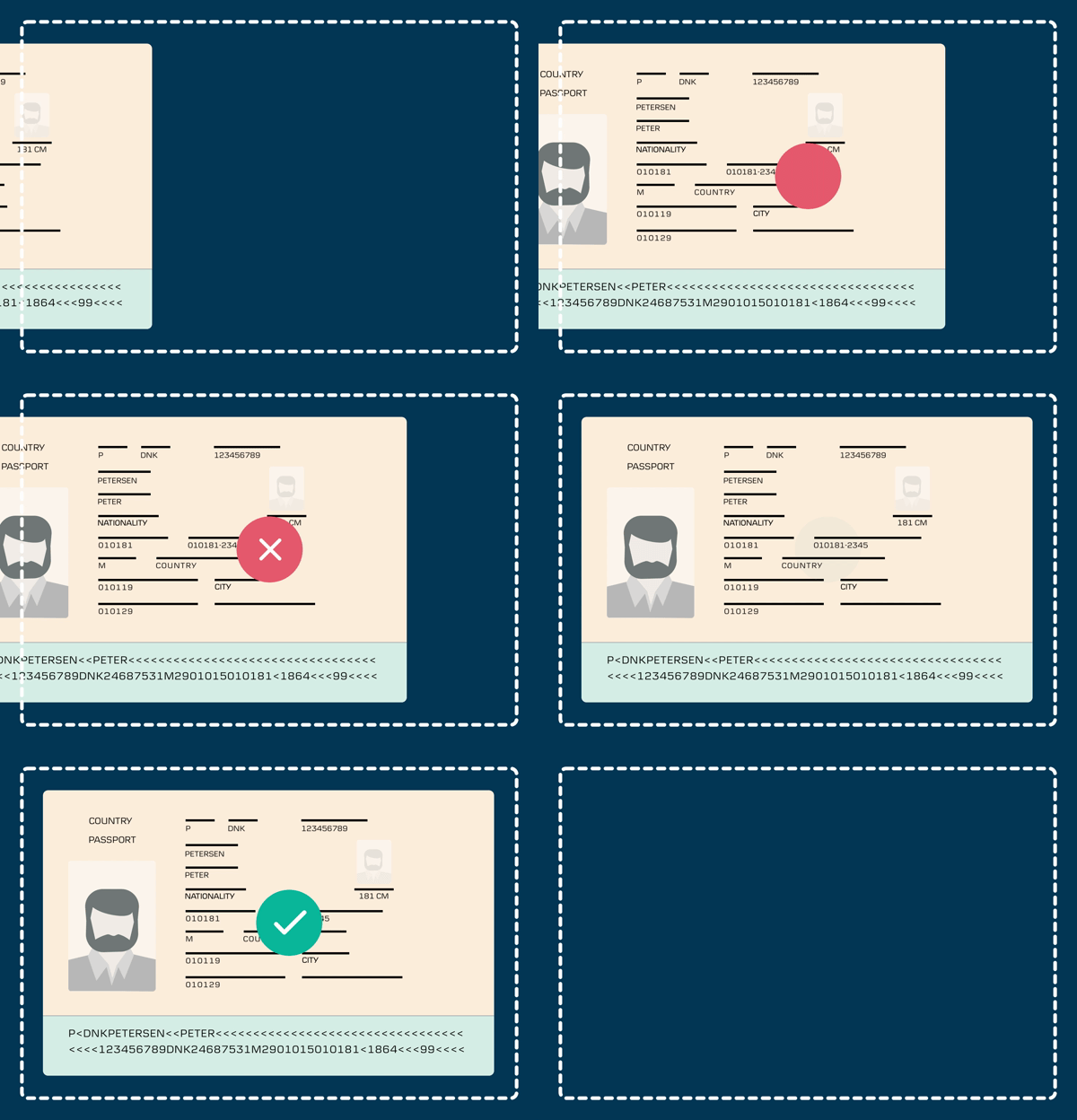
Examples of proof of identity picture
Q&A regarding the uploading of documentation
The Anti-Money Laundering regulation requires us as a bank to be able to provide documentation to the authorities showing that we know the identities of the users in District. This is to help prevent fraudulent use of the financial system.
We understand that some users may feel inconvenienced when we ask for proof of identity and/or other information. However, just as the security checks at an airport ensure that all travelers can enjoy a safe flight, it is both necessary and in the best interests of us all that we meet the legal requirements for knowing our users. Please note that all information will be safely stored.
All banks must assess what documentation they deem sufficient to enable them to comply with the Anti-Money Laundering regulation. This includes being able to provide documentation to the authorities showing that we know the identities of any District user.
The following instructions apply to you if you are aged 18 or older and live in Denmark or living abroad.
Please note that:
Your proof of identity must be valid (i.e. not expired)
A selfie, portrait photo or similar is not a valid form of photo ID
Which proof of identity do you need to upload copies of?
Your passport or
Driver’s license and your health insurance card
If you do not have a valid passport or other type of photo ID If you do not have a passport, driver’s license or other valid photo ID, please contact Customer Service at (+45) 45 14 83 24* (English speaking support).
Please see below for a list of types of valid proof of identity.
Valid photo ID
Passport
Driver’s license issued by an EU, EEA or EFTA (Iceland, Liechtenstein, and Switzerland) country or the Faroe Islands and Greenland
Valid proof of identity without a photo
Health insurance card
Yes. You can securely upload your files via this website.
We will only share this information with third parties with your specific consent or if explicitly stated in the law. Our websites provide secure connections that encrypt files and save them on Danske Bank’s secure systems in the same way as with all other confidential information.
The requested information is a legal requirement for users with access to District. If the information is not provided, we are unable to create a customer number for the purpose of creating a new user. Please be aware of a processing time of up to 48 hours before the update is registered in our systems.
Take a photo of your proof of identity for example using your mobile phone camera or a scanner. Selfies cannot be used as photo ID.
Check that all information is included in the photo and is clearly legible
Save the file on a device (a computer or tablet for example), from which you can open this webpage
Fill in the personal data fields below
Click/tap Upload and follow the instructions
You can upload up to 10 files at a time
Click/tap Send when you have uploaded all your files
Choose between the following file formats: PDF; jpeg/.jpg/.png or gif. The maximum size for each file is 4 MB.
How to take a picture of your passport
Place your passport on a table or other flat surface.
For the passport picture, you only need to take a picture of the page that contains your photograph, name, etc.
Make sure there is enough light – but avoid any reflection.
Make sure that your picture includes all the information on the passport page.
If you have questions or need assistance for filling in the form, please contact us here (+45) 45 14 83 24* (English speaking support).
The requirements across countries are not exactly the same. Therefore, you can experience that we request additional information - this applies if you for example are an account mandate holder of Norwegian, German or Polish accounts.
Danske Bank’s use of cookies and processing of personal data
We use data from our own cookies and data from cookies owned by third parties. We use cookies and process personal data for the purpose of remembering your settings, improving our services, measuring traffic, showing you relevant messages (including profiling) and tracking your use of our website. You can choose to accept our use of all cookies, our use of functional, statistical and marketing cookies or our use of necessary cookies only. Your consent covers the use of both cookies and the associated processing of personal data. To get more information, click use of cookies and processing of personal data. To read more about how to revoke your consent, click the cookie guidelines link at the bottom of our website.
Content is loading
Show
Hide
Show more rows: All table rows are already visible for screen readers.
Show less rows: All table rows are already visible for screen readers.